
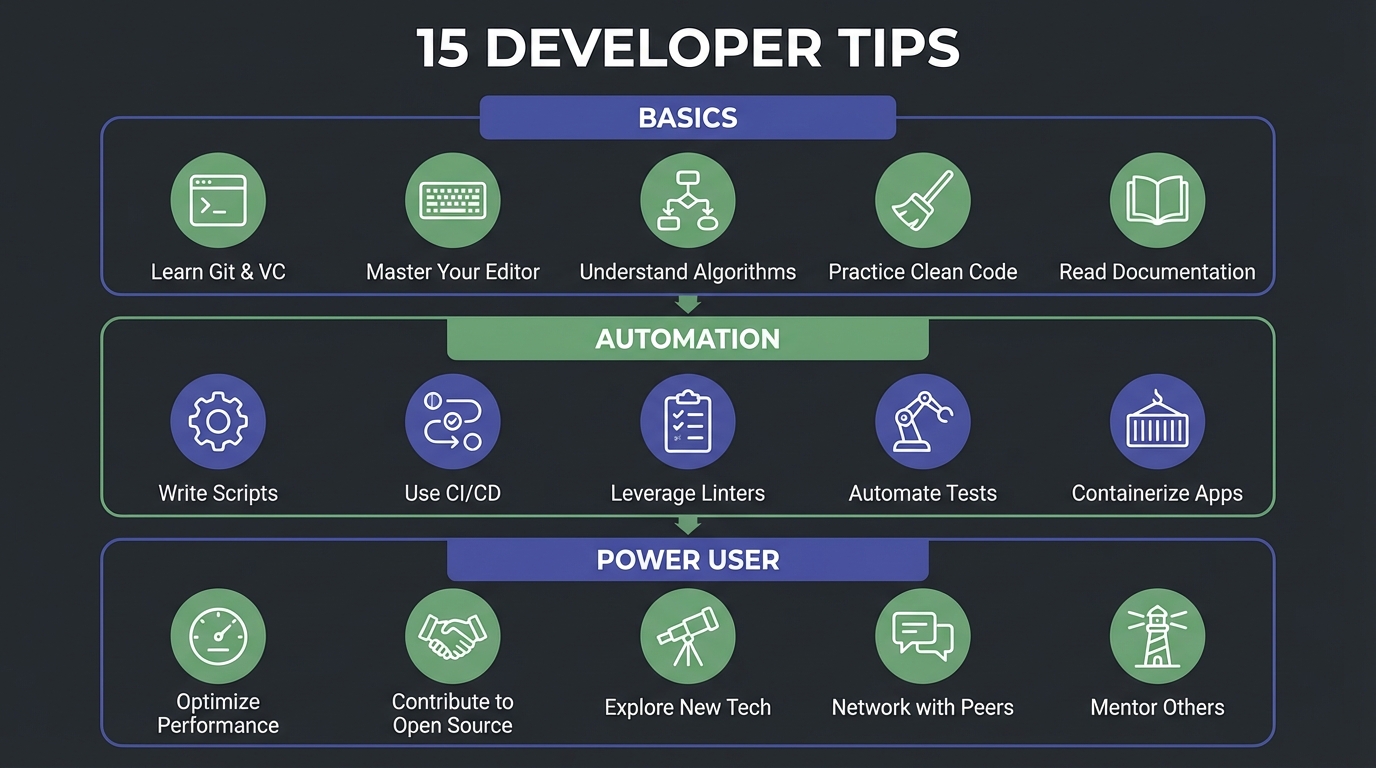
Most claude code tips lists dump 50 items on you without saying which ones matter. I have been using Claude Code daily since it launched, and I can tell you that about a dozen habits separate the people who love it from the people who rage-quit after a week. These 15 are ranked by impact, beginner to advanced, so you get value from tip one whether you started yesterday or six months ago. As of February 2026, 4% of all public GitHub commits (roughly 135,000 per day) are authored by Claude Code. That number will keep climbing. The question is not whether to use it, but whether you are using it well.
The Basics That Pay Off Immediately#
Tip 1. Write a CLAUDE.md file. This is the single highest-ROI thing you can do. Drop a CLAUDE.md in your project root and tell Claude Code how your project works: what the tech stack is, which directories matter, what conventions you follow.
Think of it as onboarding docs for an AI teammate. For CLAUDE.md best practices, keep it under 200 lines or it starts hurting more than it helps.
Tip 2. Use /clear between unrelated tasks. Power users on Reddit are adamant about this one. Claude Code carries context across your session, and stale context from a previous task leads to hallucinated references in the next one.
Finished refactoring the auth module? Hit /clear before you start debugging the payment flow.
Tip 3. Lower auto-compaction to 60-75%. The default kicks in at around 95% of your context window. By then, Claude Code has already started forgetting important details.
Setting it to 60-75% keeps the working memory tighter and the outputs sharper.
Tip 4. Be specific in your prompts. "Fix the bug" is a coin flip. "The /api/users endpoint returns 500 when the email field contains a plus sign, here is the error log" is a guaranteed fix.
Give Claude Code the file path, the error message, and the expected behavior. Every detail you add removes a guess it has to make.
Tip 5. Scope your tasks small. I used to ask Claude Code to "refactor the entire API layer." It would try, run out of context, and produce inconsistent results.
Now I break it into single-endpoint chunks. Smaller tasks finish faster and produce cleaner diffs.
CLAUDE.md Dos and Don'ts
Automate the Repetitive Stuff#
Tip 6. Use claude code hooks for formatting. Here is the thing people learn the hard way: CLAUDE.md rules get ignored about 20% of the time in long sessions.
Hooks run deterministically. Every single time.
If you want Prettier to run on every edit, stop putting it in CLAUDE.md and set up a PostToolUse hook instead. But be smart about when you trigger it. Format on the Stop hook instead, so it runs once when Claude Code finishes its work.
{
  "hooks": {
    "PostToolUse": [{
      "matcher": "Edit|Write",
      "hooks": [{ "type": "command", "command": "jq -r '.tool_input.file_path' | xargs npx prettier --write" }]
    }]
  }
}
Tip 7. Block dangerous commands with PreToolUse. You can set up a hook that intercepts bash commands before they run. I block rm -rf, DROP TABLE, and force pushes.
Two minutes to configure. Could save your production database.
{
  "hooks": {
    "PreToolUse": [{
      "matcher": "Bash",
      "hooks": [{ "type": "command", "command": "jq -r '.tool_input.command' | grep -qE 'rm -rf|DROP TABLE|force push' && echo 'BLOCKED' && exit 1 || exit 0" }]
    }]
  }
}
Tip 8. Create custom slash commands. Drop a markdown file in .claude/commands/ and you have a reusable prompt you can trigger with /. I have one called /review that runs a security-focused code review against main:
Review the code changes in the current branch against main.
Focus on: security issues, performance regressions, missing tests.
Output a markdown checklist with severity ratings.
Three lines. Saves me ten minutes every PR. Tip 9. Connect claude code MCP servers. This is where Claude Code stops being a smart editor and starts being a team member. The servers that make the biggest difference:
- GitHub MCP for reading issues, reviewing PRs, and checking CI status
- Sentry MCP for looking up production errors without leaving the terminal
- Database MCP for querying your schema directly during debugging
Reddit users who made this jump say they never went back.
Tip 10. Keep skills under 500 words. If you are writing custom skills (
.claude/commands/files with complex instructions), keep them tight. A 500-word skill works. A 2,000-word skill eats your context window for lunch.
CLAUDE.md vs Hooks: Rule Compliance Rate
The Power User Tier#
Tip 11. Offload research to claude code subagents. When you are in the middle of a large refactor, the last thing you want is Claude Code burning context on a research tangent. Spawn a subagent to investigate a question, let it report back with findings, and keep your main session focused.
Context is your most precious resource. Guard it.
Tip 12. Use Agent Teams for parallel work. Three independent modules that all need the same migration? Spin up an agent per module.
They work in parallel, each in their own context. You review the results. The closest thing to "throwing more engineers at it" that actually works.
Tip 13. Run overnight jobs in Docker. This is the move nobody talks about in tip lists. Spin up a Docker container with --dangerously-skip-permissions, give it a big prompt, and let it run while you sleep.
docker run --rm -v $(pwd):/workspace \
  -e ANTHROPIC_API_KEY=$ANTHROPIC_API_KEY \
  claude-code --dangerously-skip-permissions \
  -p "Refactor all API routes to use the new auth middleware"
Wake up to a finished migration. Review the diff with coffee. The usage limits still apply, but unattended overnight runs maximize what you get from them. Tip 14. Isolate risky work in git worktrees. Before letting Claude Code attempt a large refactor, create a worktree. If the result is garbage, you delete the worktree and lose nothing. If it is good, you merge it. Zero risk to your working branch. Tip 15. Combine hooks, skills, and CLAUDE.md intentionally. These three systems overlap, and knowing when to use which one matters:
- CLAUDE.md for guidance and preferences (around 80% compliance)
- Hooks for rules that must be enforced every time (100% compliance)
- Skills for complex, reusable workflows loaded on demand Getting this wrong means either wasted context or ignored instructions.
When to Use What: Hook vs CLAUDE.md vs Skill
When to Use What: Hook vs CLAUDE.md vs Skill
The Pattern Behind All 15#
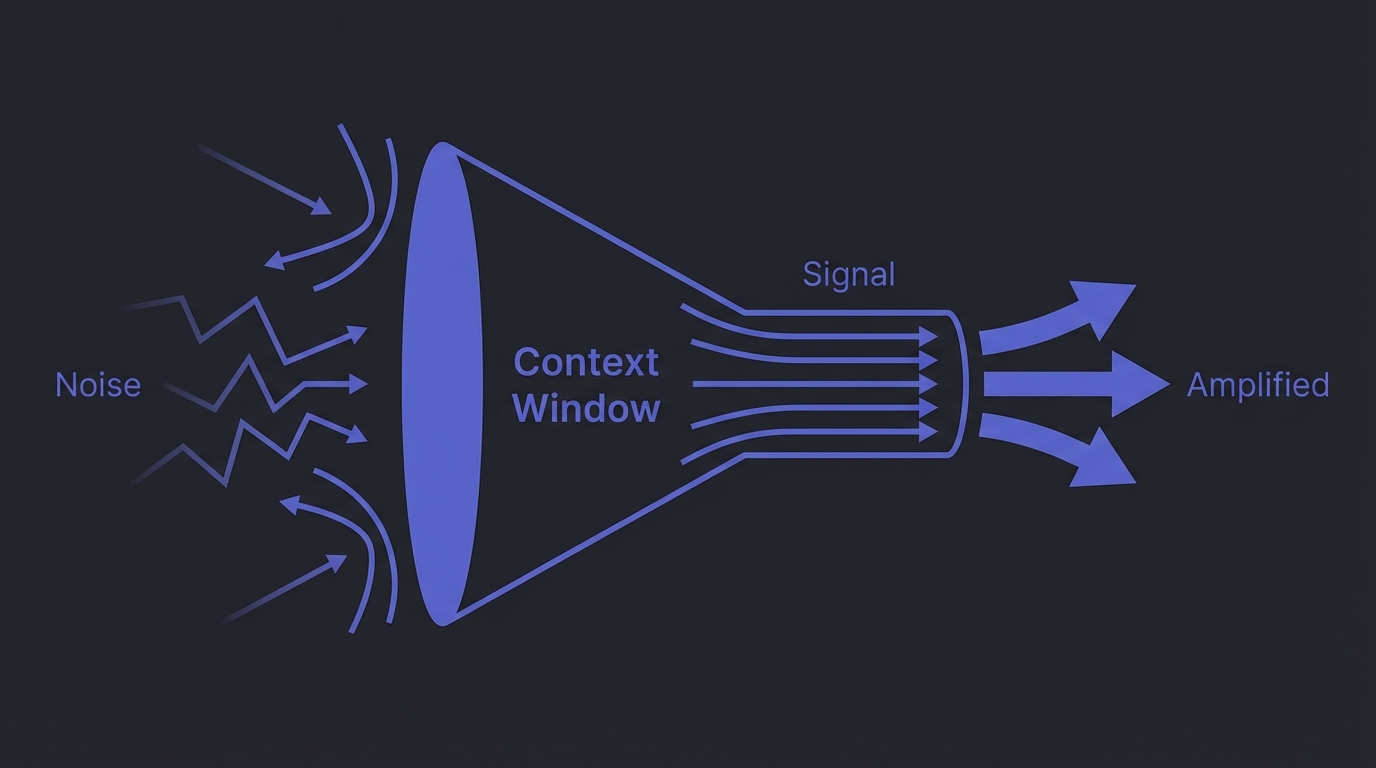
One principle connects every tip on this list: reduce noise, increase signal in context.
CLAUDE.md under 200 lines means less noise. /clear between tasks resets your signal.
Small scoped tasks keep context focused. Hooks replace CLAUDE.md rules so context-carried instructions vanish entirely.
Subagents for research? Protecting your main context from bloat.
Context is finite. Every token Claude Code spends reading irrelevant information is a token it cannot spend reasoning about your actual problem. The best claude code tips all come back to this.
Protect the context window and the quality follows.
What to Do Next#
Pick one tip from each tier and apply it today. Not all fifteen. If you do not have a CLAUDE.md file, write one right now. If you already have one, move your formatting rules to a hook. If you are already using hooks, try spawning a subagent for your next research-heavy task. The gap between casual use and real claude code productivity is not about knowing more features. It is about building habits that keep the signal clean. Start with one. Build from there.