Finding Domains Is Simple With Gemini and Antigravity
July 20, 2026

To find an available domain name with AI, skip the web name generators and hand the job to a terminal coding agent instead. You describe the domain you want in plain language, and the agent writes a script that checks each candidate against the live domain registry, so it hands back only names that are not already registered.
The .com you want is already taken#
You know the feeling. You type your perfect .com into a registrar, it is gone, and so are the next six you try. The math makes that almost inevitable.
There are 163.6 million .com domains registered right now, the largest slice of a domain space that has passed 392.5 million names total. The good short ones went years ago.
How gone? Every single four-letter .com is registered, all 456,976 of them. So when you ask a tool to find an available domain name with AI, you are asking it to search a haystack that is almost entirely needles someone else already owns.
That scarcity is exactly why manual searching feels endless. You brainstorm ten names, paste them one by one, and nine bounce. A method that generates and filters in the same motion is the only thing worth your evening.
Why AI name generators hand you taken domains#
An AI domain name generator on the web has one job it cannot actually do: prove a name is free. It produces names that sound plausible and leaves the checking to you. Whether these tools verify anything is a gripe people have aired for years, including on the Hacker News thread where one such generator made the rounds.
The reason is baked into how a language model works without tools. Asked to invent a domain, it is doing open-ended generation, and open-ended generation is where models hallucinate most. "This name is available" is a factual claim it has no way to look up, so it guesses.
The gap is stark. On open-ended tasks the error rate runs 40 to 80 percent. Ground the same model in a real lookup and it drops to around 1 percent. An ungrounded model guessing at availability is the failure, and a live registry call is the fix.
Give the model a shell, not a suggestion box#
A web generator can only talk. A terminal AI agent can act. That single difference is the entire method: an agent with shell access can write a script, hit the authoritative registry, and check its own answer before it shows you anything.
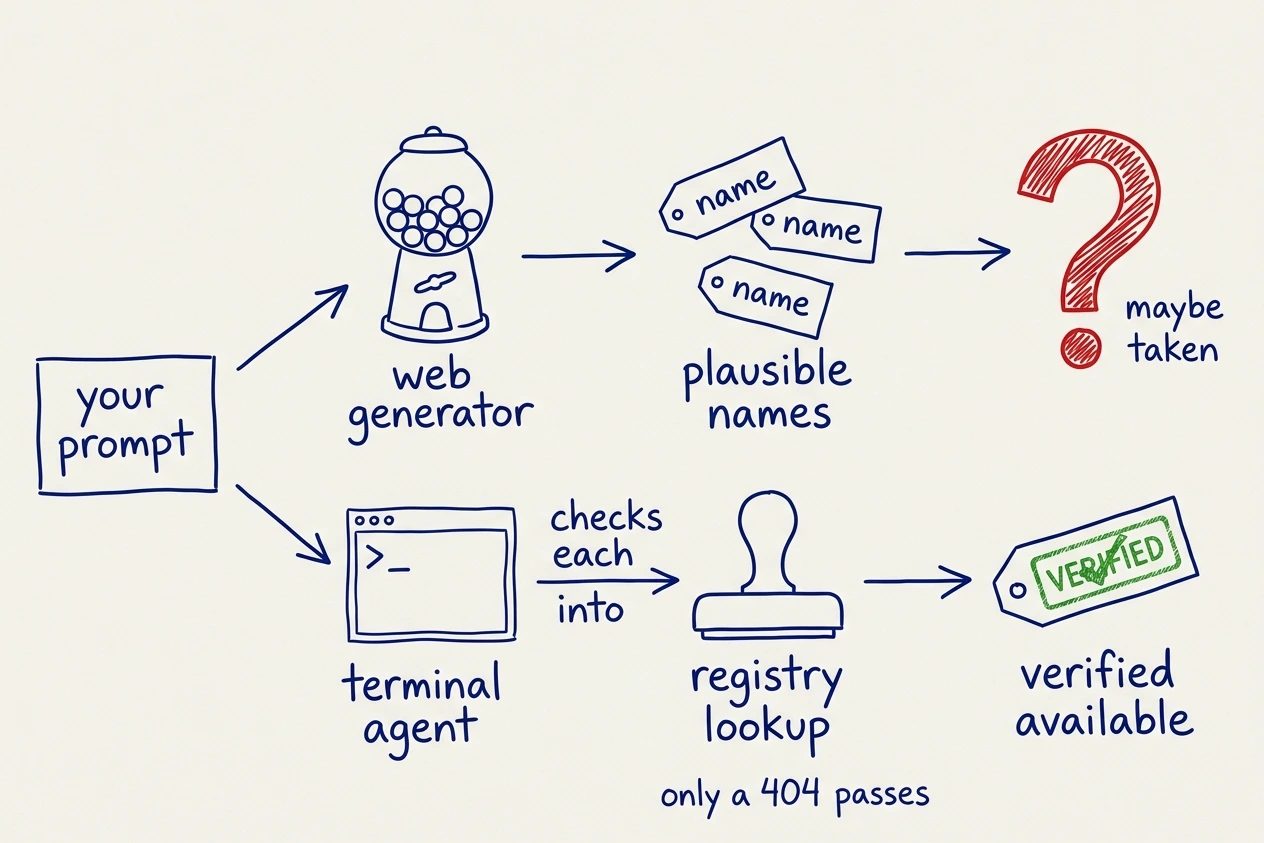
Generation stays creative. Verification becomes deterministic. Here is the loop the agent runs, and the one you would otherwise write by hand.
- Brainstorm a batch of candidate names from your description of the product.
- For each name, query the registry: RDAP for .com, raw WHOIS for TLDs outside the bootstrap.
- Keep only the names that come back unregistered, and label the rest as taken.
The agent I used for every test here is agy, the Antigravity CLI running Gemini 3.1 Pro, but nothing below depends on it. Any shell-capable coding agent runs the same loop, so use whichever one you already have open.
Reliability from agents in the wild is uneven, which I dug into in what actually works with AI agents in production. Domain checking is one of the clean cases, because the ground truth is one HTTP call away.
Note: I had no domain plugins or skills installed. agy plugin list returned "No imported plugins". Every check below is the agent improvising with a shell, not a bundled tool doing the work.Just describe the domain you want#
The simple pathPATHThe shell environment variable listing directories searched in order when a command name is typed, so every lookup walks each entry until one matches.See also WSLENV, appendWindowsPath, command lookup is genuinely just talking. I described a product and asked for names that survive a real check domain availability step. Here is the exact prompt.
Build me a name for a tool that turns messy bank CSV exports into
clean, categorized ledgers. Find 5 .com domains that are ACTUALLY
available and verify each one before you show me.
With no domain tooling installed, agy wrote its own check on the spot. It hit Verisign's RDAP endpoint for each candidate, reading a 404 as unregistered and a 200 as taken, then returned only the survivors.
No domain plugin here, so I checked each name against Verisign's
RDAP endpoint (404 = unregistered, 200 = taken):

  AVAILABLE
    csv2ledger.com
    mintmycsv.com
    csv2books.com
    tidybankcsv.com
    ledgerifycsv.com

  TAKEN
    cleanmycsv.com
    bankcsvcleaner.com

All five available names returned 404 from rdap.verisign.com.
Afterward I ran an independent RDAP/WHOIS checker over all seven names. Five free, two taken, exactly as reported. Seven of seven correct, zero false "available" on the first try.
Trust, but verify: RDAP and the .io trap#
You should not take any agent's "available" on faith the first time. The good news is you can confirm any single name in one line. RDAP is the authoritative registration-data source now that ICANN sunset the old WHOIS port-43 obligation in January 2025.
This is the RDAP domain lookup the agent runs under the hood, and it is the same one you can run to spot-check it.
curl -s -o /dev/null -w "%{http_code}" https://rdap.verisign.com/com/v1/domain/quietrow.com
# 404  -> not registered
# 200  -> already taken
A 404 means the name is not registered, which is most of what you want to know. It does not promise a standard price. Registry-reserved and premium names also come back not-found, and premium tiers are common on short names, so glance at the registrar's price before you celebrate.
That 404 also only means "free" for TLDs Verisign actually serves. This is the trap that makes or breaks the method.
Not every TLD is in IANA's RDAP bootstrap file. .com is there, but .io and .co are not. So a naive 404 check against those TLDs reads as "available" for every name you try, which is a lie.
My second test was a .io search for a Terraform linter, and this is the beat that sold me. Unprompted, agy did not use RDAP for .io. It opened a raw socket to whois.nic.io on port 43, parsed the literal string Domain not found., and even ran github.io as a registered control to prove its parser was reading real registry state.
# .com lives in IANA's RDAP bootstrap; .io does not:
curl -s https://data.iana.org/rdap/dns.json | grep -o '"com"'  # -> "com"
curl -s https://data.iana.org/rdap/dns.json | grep -o '"io"'   # -> nothing

# so a careful agent falls back to the TLD's own WHOIS:
whois -h whois.nic.io linttf.io | grep -iq "domain not found" && echo available
# match the registry's own not-found phrase, not a generic "no match"
All four .io names checked out against my independent WHOIS pass, github.io confirmed taken. Five of five correct. The agent dodged a trap that most RDAP explainers never even mention, because it could reason about the bootstrap file instead of blindly trusting a status code.
The mechanics of that WHOIS socket, if you want to build your own, sit alongside the other terminal utilities in CLI tools you are not using yet.
Warning: A 404 on a bootstrap-listed TLD is proof of nothing else. Registry hiccups, redirects, and rate limits all return odd codes, so treat a single check as a signal and re-run it before you pay.
Push harder with a deeper prompt#
The simple prompt gets you five names. A structured prompt gets you a ranked shortlist with trademark screening. The lift from prompt depth is real, and it is the difference between a coin toss and a decision you can defend.
A deeper prompt is not longer for its own sake. It hands the agent the same brief you would give a naming contractor, so it can brainstorm wider and cut harder.
- Constraints the name must satisfy: length, pronounceability, and target TLD.
- A comparison anchor so the style is concrete, like "names Basecamp or Mailchimp would register".
- An explicit method: brainstorm across angles, bulk-check with backoff, then rank the survivors.
- A risk flag step, so it screens the winners for trademark collisions instead of you doing it later.
For the third test I put all four of those into one prompt and let it run.
Name a tool that turns messy bank CSV exports into clean ledgers.

Constraints:
  - 6 to 12 characters, pronounceable, .com
  - the kind of name Basecamp or Mailchimp would register
  - no obvious trademark collisions

Method:
  1. Brainstorm 40+ candidates across 4 angles
     (literal, metaphor, invented, compound).
  2. Bulk-check every candidate against the registry,
     with backoff so you do not get rate-limited.
  3. Rank the survivors and flag any trademark risk.
It brainstormed 50, checked all of them against Verisign with one-second spacing to stay polite, and returned counts plus a ranked list. Out of 50 checked, 26 came back available. It also flagged one winner on its own.
Brainstormed 50 candidates, checked all against Verisign RDAP
with 1s spacing to avoid rate limits.

  50 checked / 26 available

  Top picks (available, ranked):
    1. quietrow.com
    2. lakesort.com
    3. stilltally.com
    4. glintbook.com

  Trademark flag:
    oaktally.com is free, but "Oak" is heavily used in finance
    (USPTO). Consider something cleaner.
Notice the asymmetry in that trademark line, because it matters. The availability verdict came from a live registry call, and the trademark flag did not. Nothing in that run queried a trademark database, so the warning is the model reaching into training data.
That is the same ungrounded move this post argues against everywhere else. Treat the flag as a nudge to go and look, never as clearance. A real mark search, and often a lawyer, is still your job.
I spot-checked sixteen of its claims, thirteen winners and three it marked taken. Sixteen of sixteen correct. Across all three runs that is 28 of 28 verified claims and zero false positives.
Be honest about what that number proves, though. The registry is ground truth, so a correct "available" says less about the agent being clever than about it bothering to make the call at all. The real test is whether it reaches for the registry, and whether it copes when a naive lookup lies.
It passed both, on a small sample of one agent across two TLDs in a single day. That is enough for me to start naming sessions in a terminal instead of a browser tab.
Questions people ask before trusting this
Do AI domain name generators actually check if a name is available?
Most web generators do not verify anything. They produce names that sound plausible and leave the checking to you, which is why so many suggestions turn out to be registered. A terminal agent is different because it can run the availability check itself before it hands you the list.
asked on news.ycombinator.com ↗Can I trust the agent's "available" without checking myself?
You can spot-check it in seconds, and you should the first time. Ask the agent which registry it queried, then run the same lookup yourself: a 404 from the registry means the name is unregistered. Once you have seen it query the real registry rather than guess, the trust is earned rather than assumed.
asked on news.ycombinator.com ↗Do I even need an exact-match .com anymore?
Not always, but the .com is still the default people type and trust, which is why the good ones are gone. If your favorite .com is taken, tell the agent to widen the search to .io, .dev, or a two-word fusion, and it will re-run the same verification across the new set instead of leaving you to guess.
asked on news.ycombinator.com ↗So the next time you need a name, open your agent and describe the domain you want. Ask which registry it queried, run the curl one-liner yourself the first time, and let the shell do the checking. That is how you find an available domain name with AI without burning another evening pasting candidates into a registrar.