
Claude Code Skills: Turn Project Patterns Into Commands
April 1, 2026
Claude code skills are project-scoped prompt templates that encode your team's conventions as invokable commands. Instead of re-explaining your form component API every session, a skill teaches Claude Code once. One /generate-form command, and you get a convention-compliant form in seconds.
What a Skill Actually Is#
There are three layers of AI coding customization in Claude Code, and most people only know about the first one. CLAUDE.md files are always-on context, slash commands used to be standalone single-file prompts, and skills are the third layer. Since January 2026, slash commands have been merged into the skills system entirely.
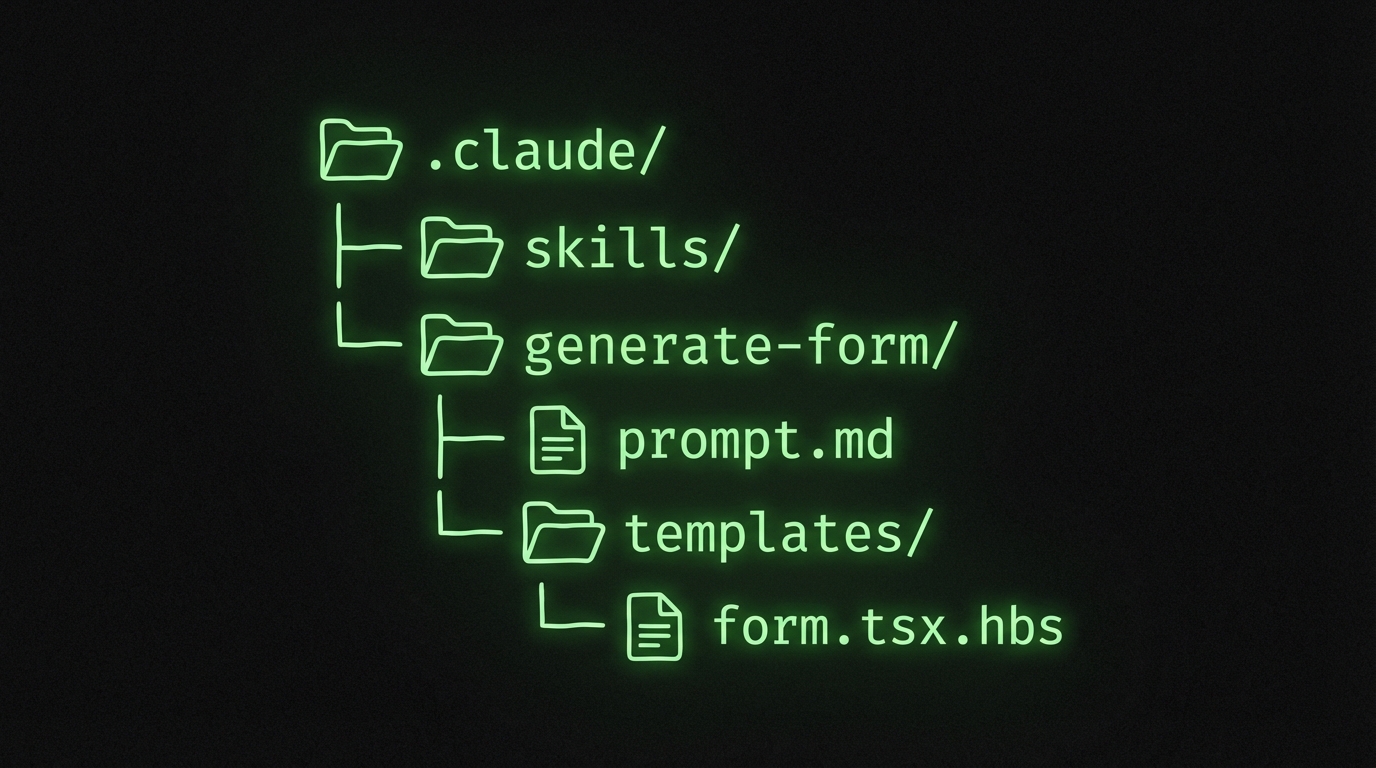
Skills are directories inside .claude/skills/. Each one contains a prompt file, optional template files, and a metadata description that tells Claude when to activate it.
Rules and skills serve different purposes. CLAUDE.md says "always use Zod for validation." A skill says "here is exactly how to scaffold a validated form, including the template, the imports, and the test file."
The official docs describe skills as dual-message injection: visible metadata plus a hidden skill-prompt. Claude reads the description, matches it to your request, and loads the full prompt automatically. You can also invoke them explicitly with a slash command.
Skills vs Rules vs Slash Commands
Why Project-Scoped Beats Global#
I spent weeks building global skills in ~/.claude/skills/ before realizing the obvious problem. My React project uses Formik. My Next.js project uses React Hook Form.
A global "generate form" skill cannot serve both without awkward conditionals. Project-scoped automation solves this by encoding YOUR specific patterns:
- Your component APIs and import paths
- Your file naming conventions and directory structure
- Your validation library and test patterns
Every team member who pulls the branch gets the same output. No Slack messages asking "what was that prompt you used for forms?"
The Antigravity Awesome Skills library has over 1,200 community skills with 22,000+ GitHub stars. But the skills that save the most time are the ones you write yourself, tuned to your project.
A Reddit thread titled "The Claude Code Divide: Those Who Know vs Those Who Don't" pulled 1.4K upvotes. The divide is real. Power users who customize Claude Code with project-scoped automation get dramatically different results from people who type freeform prompts every time.
Building a Form Generator Skill#
Here is the real payoff of claude code skills: building a reusable form generator. I will walk through creating a /generate-form skill that reads your existing FormBuilder component and scaffolds forms matching your project's conventions.
Create the skill directory:
mkdir -p .claude/skills/generate-form
Write the skill prompt in .claude/skills/generate-form/prompt.md:
---
description: "Generate a form component using our FormBuilder API"
---

# Generate Form

Create a new form component following project conventions.

## Instructions

1. Read `src/components/ui/FormBuilder.tsx` to understand the current API.
2. Accept a form name and field definitions from the user.
3. Generate the form component in `src/components/forms/{FormName}Form.tsx`.
4. Include Zod validation schema in `src/components/forms/{FormName}Form.schema.ts`.
5. Add a Vitest test file in `src/components/forms/__tests__/{FormName}Form.test.tsx`.

## Conventions

- Use `useForm` from our FormBuilder, not raw React Hook Form.
- Field names are camelCase. Labels are auto-generated from field names.
- Every form gets a loading state and error boundary.
- Export the form as a named export, not default.

## Template

// src/components/forms/{FormName}Form.tsx
import { useForm, FormBuilder, Field } from '@/components/ui/FormBuilder';
import { {formName}Schema } from './{FormName}Form.schema';

export function {FormName}Form({ onSubmit }) {
  const form = useForm({
    schema: {formName}Schema,
    defaultValues: {/* generated from fields */},
  });

  return (
    <FormBuilder form={form} onSubmit={onSubmit}>
      {/* Fields generated here */}
    </FormBuilder>
  );
}
That prompt does three things a CLAUDE.md rule cannot. It reads your actual component source. It bundles a template with the exact import paths your project uses.
A developer replaced their entire Plop.js setup with a single Claude Code skill for component generation. Their take: "templates are more powerful than rules" because claude code skills load templates explicitly rather than hoping Claude remembers them from context.
From Prompt to Running Form#
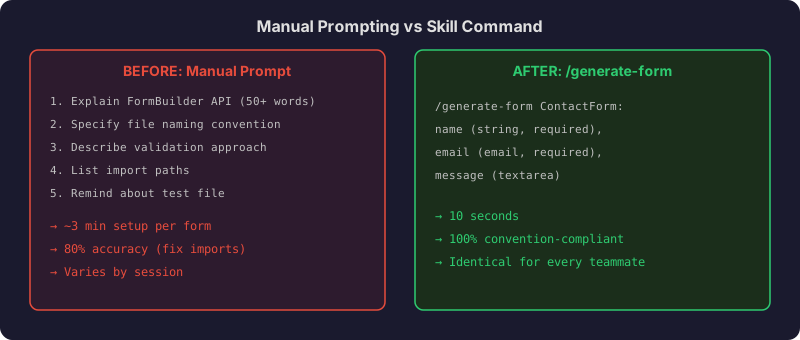
Skills turn verbose prompts into micro commands. Without a skill, generating a form means typing a paragraph explaining your FormBuilder API, file naming convention, validation library, and directory structure. Claude gets it 80% right, and you fix the imports manually.
With the skill, you type:
/generate-form ContactForm: name (string, required), email (email, required), message (textarea)
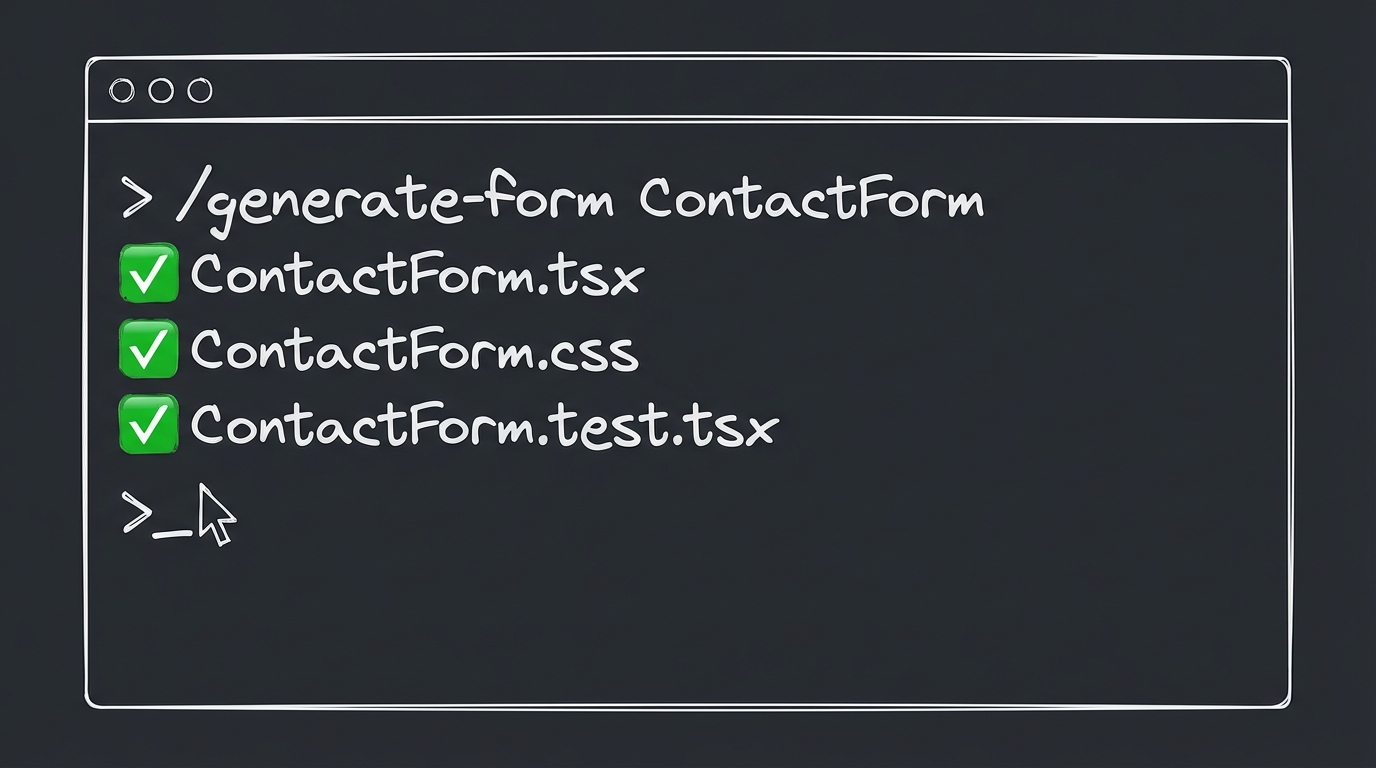
Claude reads the skill prompt, checks your actual FormBuilder source, and produces three files:
The generated form component:
// src/components/forms/ContactForm.tsx
import { useForm, FormBuilder, Field } from '@/components/ui/FormBuilder';
import { contactFormSchema } from './ContactForm.schema';
import type { z } from 'zod';

export function ContactForm({ onSubmit }: { onSubmit: (data: z.infer<typeof contactFormSchema>) => void }) {
  const form = useForm({
    schema: contactFormSchema,
    defaultValues: { name: '', email: '', message: '' },
  });

  return (
    <FormBuilder form={form} onSubmit={onSubmit}>
      <Field name="name" type="text" required />
      <Field name="email" type="email" required />
      <Field name="message" type="textarea" />
    </FormBuilder>
  );
}
The validation schema:
// src/components/forms/ContactForm.schema.ts
import { z } from 'zod';

export const contactFormSchema = z.object({
  name: z.string().min(1, 'Name is required'),
  email: z.string().email('Invalid email address'),
  message: z.string().optional(),
});
Three files, correct imports, right directory. Every time.
If you have already set up your CLAUDE.md following our tips guide, adding skills is the natural next step. CLAUDE.md teaches Claude about your project. Skills teach it how to act on that knowledge.
Start With One Command#
Do not build a library of 20 skills on day one. Pick the one prompt you type most often.
For me, it was form generation. For you, it might be API endpoint scaffolding, test file creation, or component boilerplate.
Here is the process:
- Find your most repeated manual prompt in Claude Code.
- Create
.claude/skills/your-skill-name/prompt.md. - Move your prompt into the file with a
descriptionfrontmatter field. - Add any templates or example outputs to the same directory.
- Commit the directory to git so your team gets it automatically.
That is it. One skill, shared across every developer on the project. No context window budget wasted re-explaining conventions.
The deep dive on Claude skills architecture is worth reading if you want to understand the injection model. But you do not need to understand internals to start. Write a prompt file, put it in the right directory, and invoke it.
Skills are not about being clever with AI. They are about being lazy in the right way. Encode the pattern once, run it forever.