
A Claude Code dev container is the sandbox you skipped
August 25, 2026

A claude code dev container is the isolation the host CLI never gave you. The process on the laptop can read the project. It can also wander into $HOME.
Anthropic's sandbox comparison is blunt. The built-in Bash sandbox restricts Bash. File tools, MCP servers, and hooks still run on the host.
Think of the host install as a master key on a lanyard. Every floor of the machine is a door. The container is a keycard that only opens the project room, plus whatever you bolted onto the image.
The official dev container page is the path. Commands Claude runs execute inside Docker. Edits still land in the local repo as you work.
This is not the Telegram path. Channels without granting root talks to a live host session. This one moves the session off the laptop home.
End state is three checks. Rebuild Container. claude --version in the container terminal. A bash command cannot see the host home.
What has to exist first#
The feature JSON will not save a dead Docker daemon. VS Code's tutorial wants Docker running and the Dev Containers extension installed before anyone talks about devcontainer.json.
- Docker Desktop 2.0+ on Mac or Windows, or Docker CE 18.06+ on Linux. The whale icon in the tray should be still, not spinning.
- VS Code plus the Dev Containers extension
ms-vscode-remote.remote-containers. Cursor, Codespaces, and JetBrains IDEs that speak the spec also work. - Windows needs the WSL 2 backend. The Ubuntu snap package is not supported. Windows container images are not supported.
Confirm Docker from a host terminal, not from a leftover container tab. docker --version only proves the client is installed. docker info talks to the daemon.
docker infoYou want a Server section back. A client-only dump, or Cannot connect to the Docker daemon, means the rest of this post is theater.
The VS Code agent host is a process, not a panel. That story lives in a process not a panel. Here the process has to live inside Docker.
Add a claude code dev container#
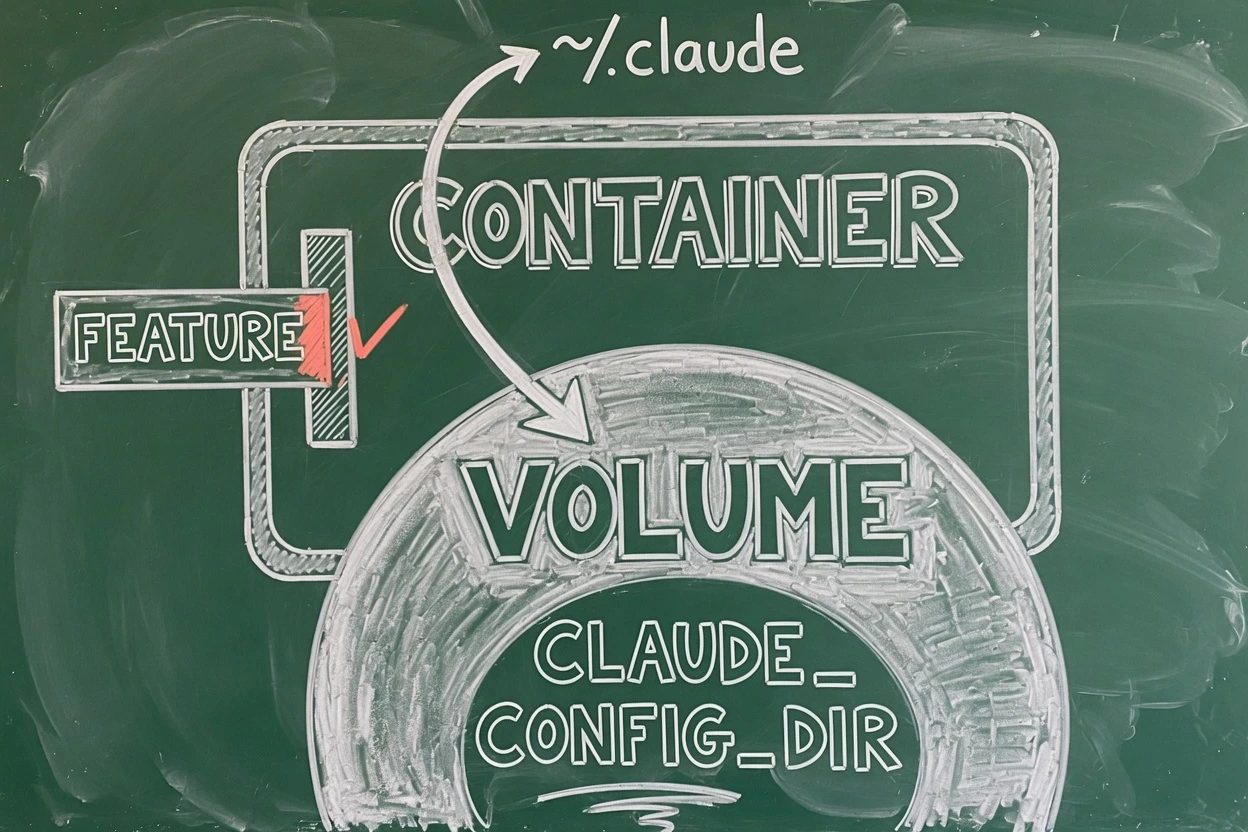
The JSON looks tiny. The footgun is the home path. Anthropic's persist snippet assumes remoteUser is node. Microsoft's ubuntu base uses vscode. Mix those and the volume mounts to a home that does not exist.
Pick one pair and keep it. This post uses the ubuntu base, the Node feature, remoteUser vscode, and /home/vscode/.claude.
1. Write the feature block#
Save this as .devcontainer/devcontainer.json. The Node feature sits above Claude Code on purpose. Debian images can ship nodejs without npm, and the Claude Code feature then dies with Failed to install Node.js and npm.
{
  "image": "mcr.microsoft.com/devcontainers/base:ubuntu",
  "remoteUser": "vscode",
  "features": {
    "ghcr.io/devcontainers/features/node:1": {},
    "ghcr.io/anthropics/devcontainer-features/claude-code:1.0": {}
  },
  "mounts": [
    "source=claude-code-config,target=/home/vscode/.claude,type=volume"
  ],
  "containerEnv": {
    "CLAUDE_CONFIG_DIR": "/home/vscode/.claude"
  }
}
The :1.0 tag pins the feature's install script, not the CLI. Anthropic's docs say the feature installs the latest Claude Code, and the CLI auto-updates inside the container by default.
npm is deprecated on the host. The official feature still runs npm install -g @anthropic-ai/claude-code with no version pin. Super. That is the official install, not a reason to rewrite install.sh.
Checkpoint. The file exists at .devcontainer/devcontainer.json. The Claude Code feature is present. The Node feature is listed above it.
2. Persist login on a volume#
Skip this step and every Rebuild Container is a fresh login. The container home is discarded on rebuild. Auth lives under ~/.claude. The OAuth account file ~/.claude.json sits outside that folder.
A volume at ~/.claude alone does not keep you signed in. Set CLAUDE_CONFIG_DIR to the same path so Claude Code writes .claude.json inside the volume. That pair is already in the JSON above.
Do not bind-mount the host ~/.claude. That shares login, and it also shares host-shaped state the sandbox was supposed to skip. A named Docker volume keeps tokens without handing the laptop home to the agent.
Per-project isolation, if you want it, is source=claude-code-config-${devcontainerId}. Anthropic's reference container uses that. One shared volume across every repo is how client work leaks into a side project.
Checkpoint. mounts points at /home/vscode/.claude. CLAUDE_CONFIG_DIR matches. Host ~/.claude is not in the file.
3. Rebuild Container, not Reopen#
Dev Containers: Reopen in Container feels like a rebuild. It is not. Features install on image build. A JSON change that only reopens leaves you staring at the old image, wondering why claude is missing.
Command Palette, Ctrl+Shift+P on Windows and Linux, Cmd+Shift+P on Mac. Run Dev Containers: Rebuild Container.
The window reloads. A progress toast chews through the feature scripts. First build is slow. Later reopens are not.
Checkpoint. The status bar on the far left names the container. A new terminal prompt is inside the image, not on the host.
4. Sign in from the container terminal#
Open a terminal in the rebuilt window. Any terminal VS Code opens now runs inside the container. That is the whole trick.
claudeAnthropic OAuth opens a browser. Cloud providers read env vars instead, with no browser prompt. Pass those through containerEnv or a Codespaces secret. Do not mount ~/.aws from the host.
The callback often dies in Docker. Anthropic's install troubleshooting names this as common in Dev Containers. Copy the URL, finish login in any browser, paste the code at Paste code here if prompted.
Checkpoint. claude is authenticated. The session is inside the container. You'll hit a second login after the next rebuild if the volume pair is wrong. That is the persist trap, not a flaky token.
Prove the claude code dev container skipped the host#
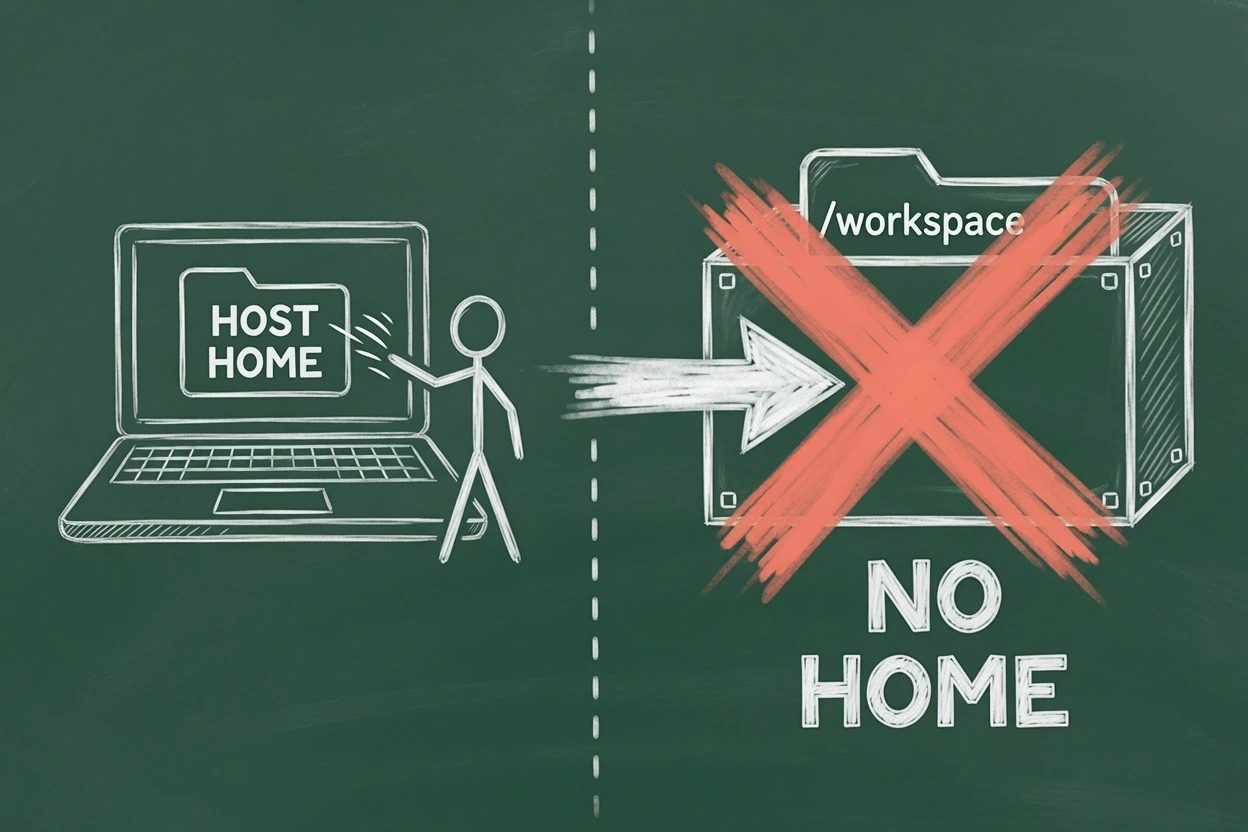
Architecture first, then two commands. Claude Code, the terminal, and the build tools run inside the container. The host repo is bind-mounted as the workspace. Host home is not on that list unless you added it.
5. Print claude --version inside#
Same container terminal. Not a host tab that still has the old prompt.
claude --version
echo "HOME=$HOME"
claude --version should print a version. HOME should be /home/vscode. If HOME is still the laptop path, the session never entered the container.
The host can keep its own CLI. That binary is not this session. Leave it. Argue with PATH later.
6. Fail a lookup of the host home#
Swap in the host username. On a Mac the tell is /Users. On Linux it is /home/<your-host-user>.
echo "HOME=$HOME"
test -d /Users && echo "host mac home visible" || echo "no /Users"
test -d /home/YOUR_HOST_USER && echo "host linux home visible" || echo "no host home"
ls "$HOME"
ls /workspace 2>/dev/null || ls .
The host-home tests should fail. $HOME is the container user. Project files under the workspace mount should still list. That bind is the point. The laptop home is the thing that should stay dark.
If /Users or the host /home/... lists, someone bind-mounted too much. Find that mounts line and delete it. Then rebuild for real.
When the rebuild lies to you#
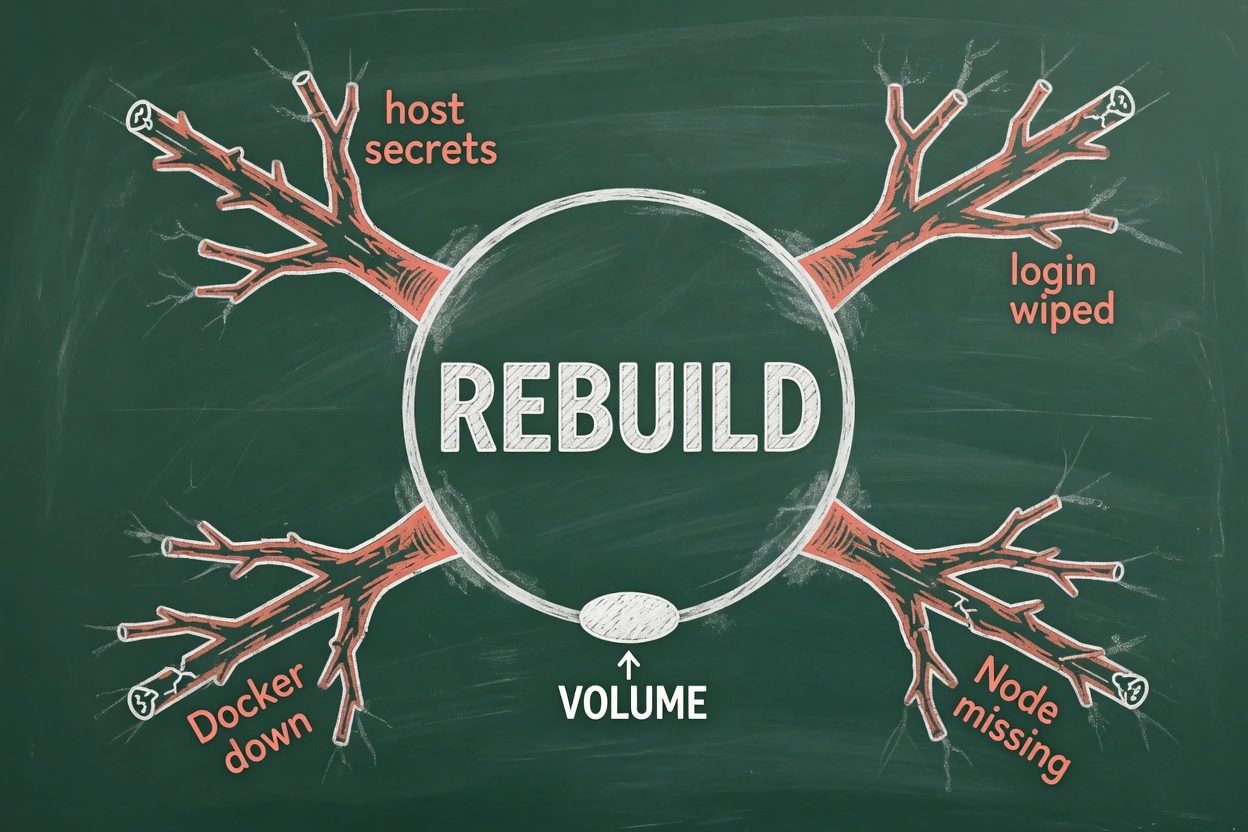
Four failures show up in the wild. They look like a broken feature. They are almost always a skipped step.
- Docker is down. VS Code cannot build. Start Docker Desktop. Run
docker infoon the host until a Server section appears, then rebuild. - Node is missing. The log ends with
Failed to install Node.js and npm. Home Assistant hit that string on Debian 13. Addghcr.io/devcontainers/features/node:1above the Claude Code feature and rebuild once. - Login dies on every rebuild. The volume is missing, or
CLAUDE_CONFIG_DIRstill points at a discarded home. Codespaces survives stop and start, then wipes~/.claudeon rebuild. Same volume recipe. - Host secrets are mounted. A bind of
~/.sshor host~/.claudeputs the laptop back on the agent's disk. Delete thatmountsline and rebuild. OAuth hangs are a paste-the-code problem, not a mount problem.
--dangerously-skip-permissions is a separate knife. The CLI rejects it as root, so remoteUser has to be a non-root account. Skipping prompts still lets Claude rewrite the bind-mounted workspace, which is the project on the host, and still lets it read credentials inside ~/.claude. Pair it with network egress limits if unattended work is the goal. A container is not a free pass to mount ~/.ssh.
Rebuild questions people actually hit
Why does login die every time you rebuild?
The container home is discarded on rebuild. Auth lives under ~/.claude, and the OAuth account file ~/.claude.json sits outside that folder. Mount a named volume at ~/.claude and set CLAUDE_CONFIG_DIR to the same path so both files land on the volume.
Does the `:1.0` tag pin the Claude Code CLI?
No. That tag pins the feature's install script. The feature installs the latest CLI, and the CLI auto-updates inside the container unless you set DISABLE_AUTOUPDATER to 1. Pin a version from the Dockerfile with npm install -g @anthropic-ai/claude-code@X.Y.Z if you need a freeze.
The browser signed in, but the terminal is still waiting. Now what?
The localhost callback often dies in a Dev Container. Copy the URL from the terminal, finish login in any browser, then paste the returned code at the prompt that says to paste the code.
asked on support.claude.com ↗The build stops on Failed to install Node.js and npm. Retry Rebuild?
Retrying does not fix it. Debian images can ship nodejs without npm, so the feature's auto-install check fails. Add ghcr.io/devcontainers/features/node:1 above the Claude Code feature, then rebuild once.
Is `/sandbox` enough, so the container is optional?
No. The built-in Bash sandbox restricts Bash and its child processes. File tools, MCP servers, and hooks still run on the host. A Dev Container puts the whole Claude Code process inside Docker.
asked on code.claude.com ↗What now exists#
A claude code dev container is running. The CLI is on the image. Login sits on a named volume behind CLAUDE_CONFIG_DIR. The container terminal cannot list the host home. The project tree is still on the host, because that bind is how edits appear in the local repo.
That last sentence is the leftover risk. Anthropic's warning is the right one. Avoid mounting host secrets. Prefer repository-scoped or short-lived tokens. No system is immune, and --dangerously-skip-permissions can still exfiltrate anything the container can read.
To freeze the CLI, drop the feature and install a pinned npm version from the Dockerfile, then set DISABLE_AUTOUPDATER to 1. The :1.0 tag will not do that job.
Prove it one more time after the next rebuild. claude --version. echo $HOME. A failed ls of the host home. If those three still hold, the sandbox you skipped is finally the one in use.