
A SuperGrok Imagine Starter Map for People Who Just Subscribed
August 1, 2026

SuperGrok Imagine is not one button. It is a set of creative modes sitting next to chat, sharing the same paid weekly usage pool. The first session usually fails the same way. Someone opens video first, re-rolls stills until the tank drops, then wonders why the plan feels thinner than the marketing. This starter map is the order that teaches the product without burning the week.
What you need open before you generate anything#
Use the real Grok product surface. That means grok.com in a normal browser, or the current iOS/Android Grok app, signed into the same account that holds SuperGrok. Alternate hosts and half-linked X logins are a common reason the upgrade never shows up.
Confirm SuperGrok is active under Settings or billing on web. SuperGrok is the consumer plan that explicitly includes image and video generation. SuperGrok Lite and SuperGrok Heavy sit around it with different weekly headroom. Exact dollar marketing changes, so treat the plan name as the gate, not a third-party table.
Open Settings → Usage once before generating. Paid SuperGrok no longer hands you separate daily buckets for Chat and Imagine. xAI's consumer FAQ describes one shared weekly pool across Chat, Imagine, Voice, and Build, shown as a percentage with a product breakdown and a weekly reset time.
- Same login on web and mobile if you bounce between devices
- Imagine surface reachable from the main Grok chrome (often labeled Imagine)
- Usage panel open in another tab so the first video does not surprise you
The map. Four surfaces, one weekly pool#
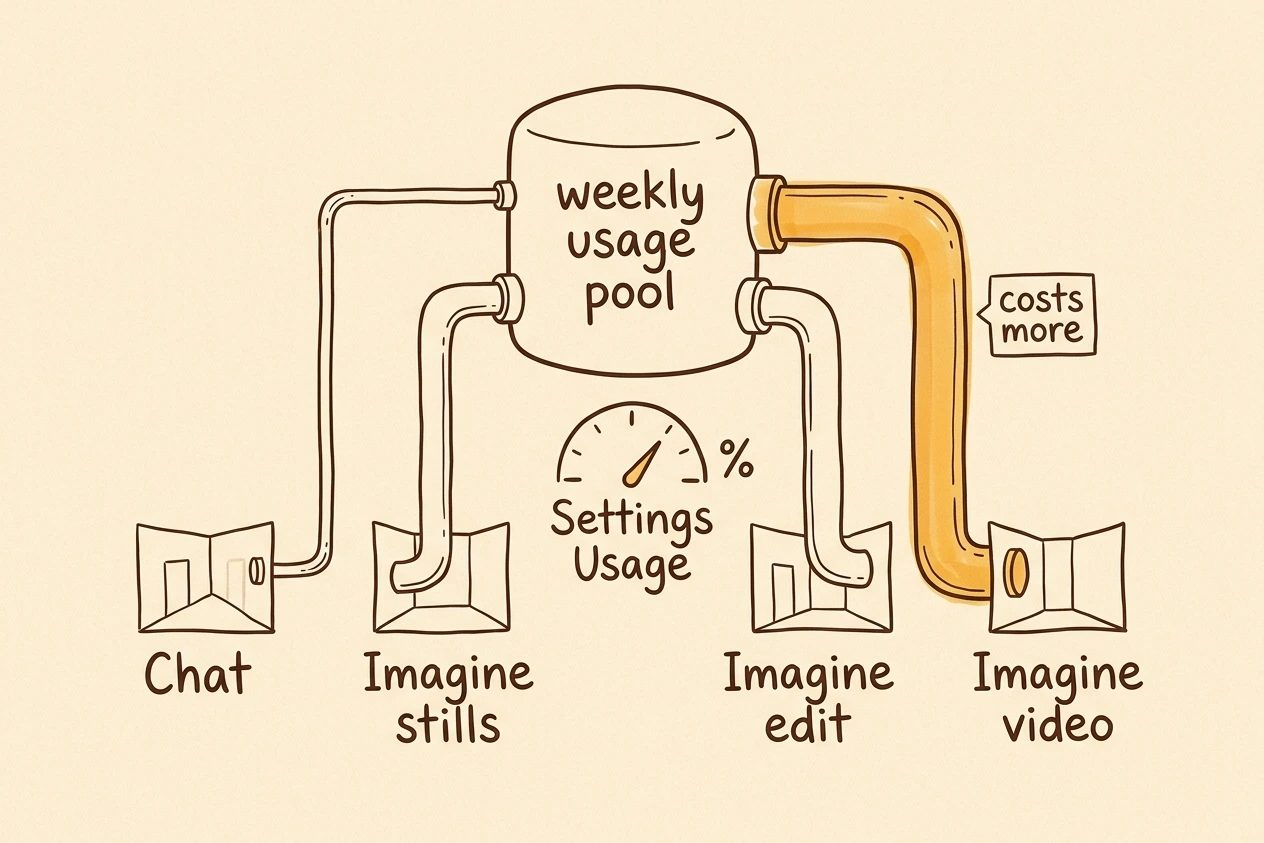
Hold this map before any prompt craft. Chat is for sharpening a scene description when the idea is fuzzy, then leave. Media is the room that moves the weekly pool harder.
Imagine stills are the practice field. Subject, light, style, and framing get learned here. Imagine edit keeps a good composition and changes one thing. Imagine video is the expensive room, because high-quality video uses far more compute than a chat turn.
The FAQ is blunt about compute. A chat message uses little of the pool. A high-quality video uses far more. That is why video feels "scarce" even on SuperGrok. Official docs do not publish a still-versus-video price card for consumers. The starter order is still stills, then edit, then one short video, because that is the low-regret way to learn without spending the week on motion first.
Capability-wise, the Imagine model suite covers more than stills. xAI's Imagine overview lists text-to-image, natural-language edits with up to three reference images, video from text or stills (duration up to 15 seconds in that docs set), plus video edit and extension. Consumer chrome will not expose every API knob on day one. The map still holds. Stills, edits, short video.
Note. Treat the API docs as a capability floor for what the models can do, not as a promise that every control appears in the SuperGrok UI tonight.
Hour one path#
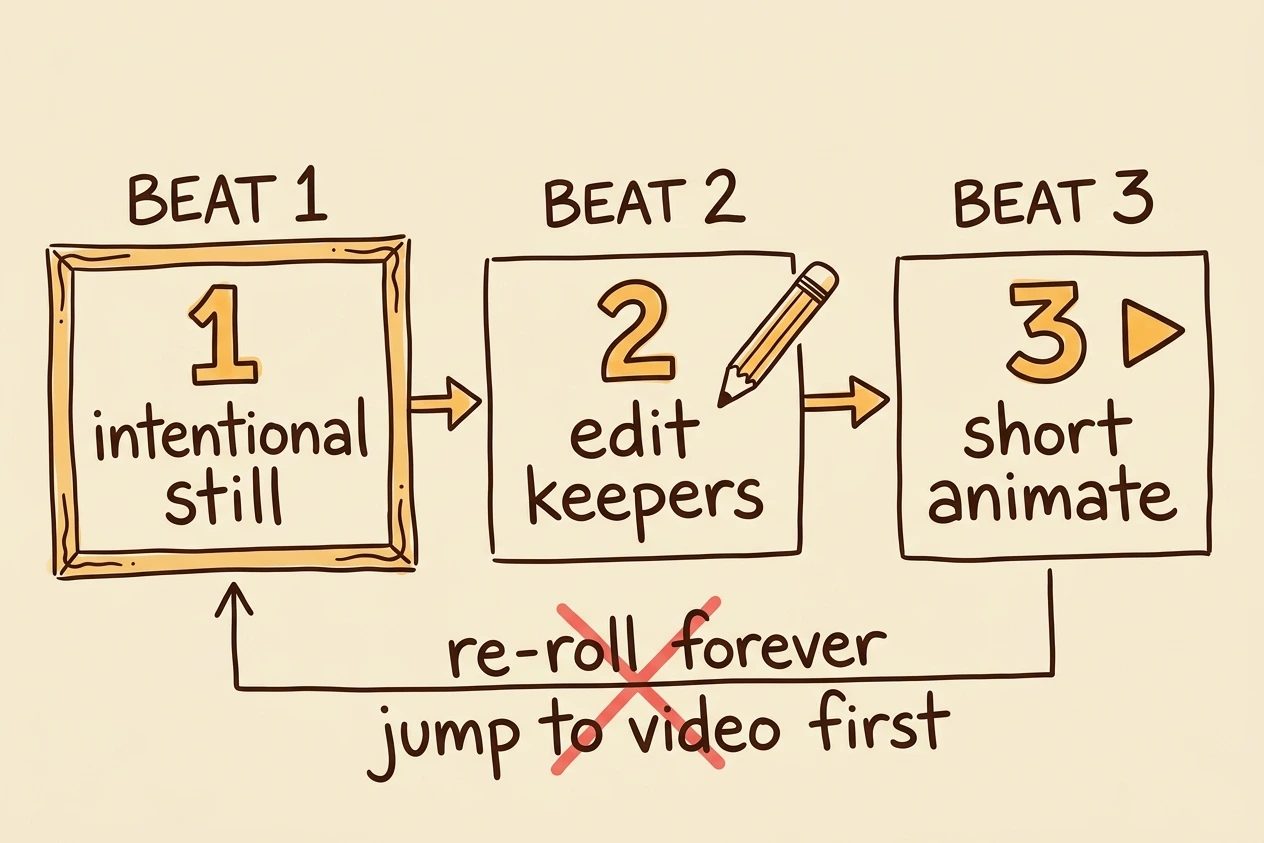
Skip the tour that tries every mode in fifteen minutes. Three core moves teach SuperGrok Imagine. A few habits after them keep the session clean. Everything else is optional for later nights.
1. Land one intentional still#
Open Imagine in image mode. A reliable first still usually needs five anchors, not a vibe word. Subject. Action or pose. Place. Light. Style or camera language.
Weak. "Cool cyberpunk street."
Stronger. "A courier in a rain-soaked alley at night, neon reflections on wet asphalt, low angle, cinematic still, shallow depth of field."
Generate a small batch, pick one keeper, stop. The checkpoint is not four near-identical re-rolls. It is a single frame you would show someone without apologizing for it.
2. Edit that still before you re-roll#
Re-rolling from zero is how the plastic look stays stuck. Edit language should change one axis. Background. Wardrobe color. Time of day. Remove a prop. Keep face and composition when those were already right. Official usage docs do not prove edit always costs less than a fresh still. The point is craft. Lock the good composition instead of gambling on a brand-new seed.
If the product offers multi-image or reference uploads, that is the same family as the multi-image edit path in the Imagine docs (up to three sources). Week one still prefers a single clean edit chain over a collage experiment.
Checkpoint. Same scene, one deliberate change, still worth keeping.
3. Animate only after the still is right#
When the look of a particular still matters, start from that still rather than pure text-to-video. Feed the keeper frame. Describe motion in plain camera language. Slow push-in. Hair in wind. Rain streaks. Slight pan. Keep the clip short while learning.
Then open Settings → Usage. Watch how much the product breakdown moved under Imagine. That single glance is the real SuperGrok lesson. Video is not "broken." High-quality video simply spends more of the shared weekly pool than a chat message.
Tip. If the first video is wrong, fix the still and re-animate once. Do not burn five video retries on a still you already disliked.
4. Set the ratio for where it ships#
Pick aspect ratio before the keeper batch, not after, when the UI exposes it. Square for profile tiles. 9:16 for phone stories and Shorts-style crops. 16:9 for blog heroes and landscape posts. 4:5 for common feed cards.
Wrong ratio wastes a good still. People generate something they like, then re-run the whole prompt only to fill a different crop. That is destination hygiene, not a SuperGrok rule. Decide where it ships first, then prompt for that frame.
5. Save keepers before the next experiment#
Download the still you would keep, and the short video if it worked. Treat in-app history as convenience, not archive. Tabs close. Accounts switch. A second device opens the wrong login.
Name files like a human. Subject, style note, date. That is session hygiene so a week of SuperGrok Imagine becomes a small library instead of a scroll of near-misses.
6. Lock one style for the session#
New subscribers often jump from photoreal to anime to sticker pack in ten minutes. That feels productive. For learning, it is noise. Pick one visual lane for the session and keep subject language stable so later edits and video stay in the same family.
A simple lock is a craft habit, not a product mode. Same lighting phrase. Same camera language. Same material words for skin, fabric, or metal. When the look drifts, edit back toward the lock instead of inventing a new aesthetic from zero.
7. Read the Usage split after the first video#
Settings → Usage is not a guilt trip. It is the scoreboard. After the first short video, note how much Imagine moved relative to Chat. That is the personal calibration for SuperGrok, not a blogger's generic daily limit table.
If Imagine already owns most of the week, stop. Write better prompts in Chat. Edit one more still. Do not "just try one more" video until the weekly reset.
8. Use Chat as a prompt desk, not a side quest#
When a scene is fuzzy, draft the prompt in Chat first if that helps. Ask for subject, place, light, camera, and three concrete material details. Paste the best line into Imagine. Do not turn Chat into a long creative therapy session that never ships a still.
The win is a sharper first still, not a longer transcript. End the chat once the prompt is ready. Chat is optional scaffolding for Imagine, not a second product to finish.
9. Change one thing per edit#
A clean edit names a single change. Make the jacket red. Move the lamp left. Soften the background. Remove the sign. Stacked requests in one edit can mush the composition the still already won.
If three things need fixing, run three short edits when patience allows. The sequence is easier to reverse when step two went wrong and step three was fine. That is edit craft, not a documented SuperGrok rule.
10. Prefer short motion prompts#
Video prompts get noisier when they try to rewrite the whole scene. Keep first-clip motion simple. Slow push-in. Gentle pan. Wind in fabric. Rain continuity. One camera move plus one environmental move is a safe starting load.
If the subject has to walk across the frame, change wardrobe, and reveal a new skyline, that is three ambitions packed into one clip. Split it or fix the still first. Official docs allow short video durations. They do not rank motion styles.
11. Plan for the watermark#
Generated images and videos include a Grok watermark, and the consumer FAQ says there is no setting to remove it. Design for that fact. Leave calm space in a corner if the composition allows. Avoid tiny text that fights the mark. Do not crop so hard that the subject dies under provenance.
If the destination bans AI marks, SuperGrok Imagine is the wrong tool for that delivery. Pick a different job for the session rather than fighting product policy.
What to ignore for week one#
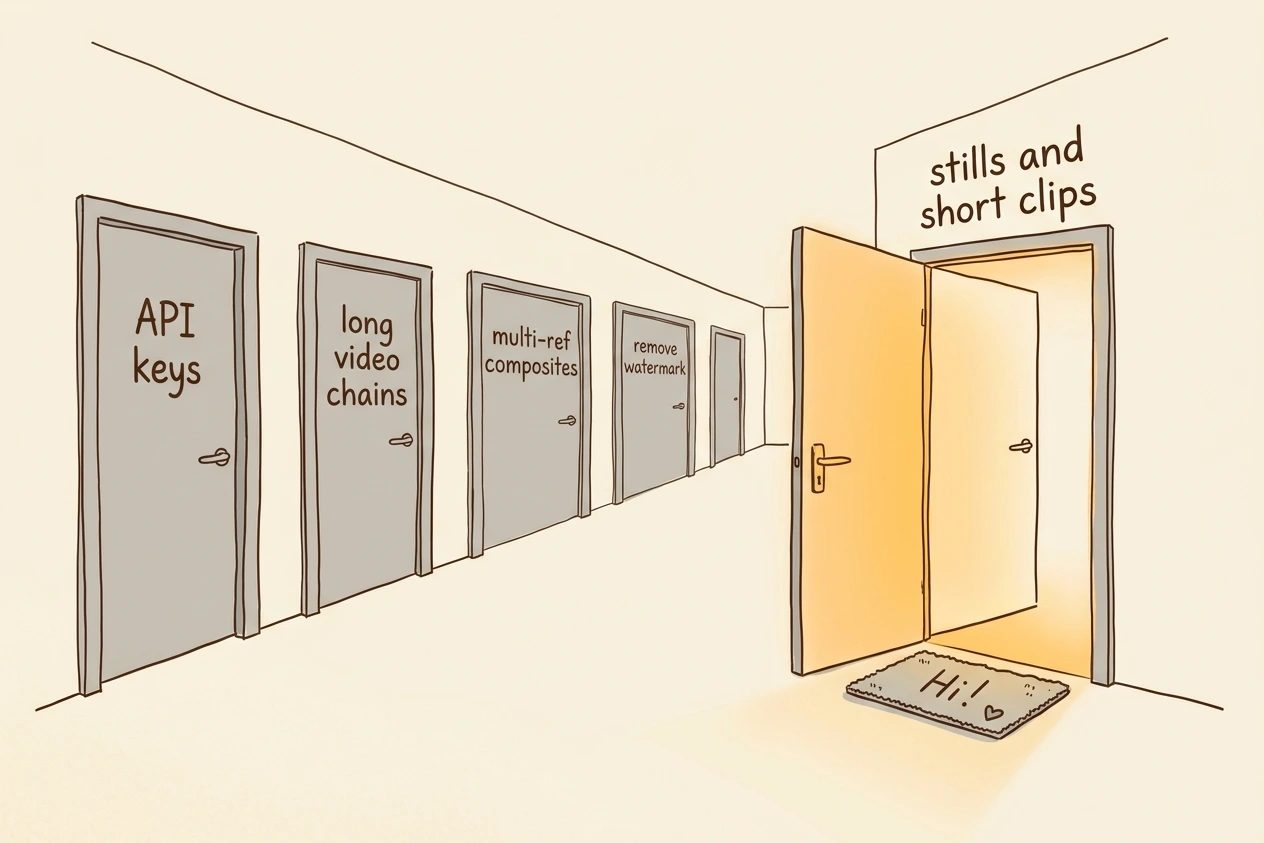
Closed doors keep the map readable.
- API pipelines. Different product surface, different billing. Leave console work for a later post.
- Extension chains. Continuing clip after clip is a power workflow. It is not orientation.
- Multi-image composites. Fun after the edit habit exists.
- Watermark removal. Generated media carries a Grok watermark. There is no official remove toggle, and stripping provenance is barred under the Acceptable Use Policy described in the consumer FAQ.
- Filter unlock myths. Enabling adult-friendly modes does not disable safety. Prohibited categories stay blocked.
When it breaks#
These are the day-one surprises that look like bugs and are not.
- 720p fallback. After the tier's 720p cap, fallback is automatic. Check Usage and try again after reset or a plan with more headroom.
- Weekly limit. Paid features pause until the weekly reset. Free-tier Chat and Voice may still work. Extra Usage Credits, Auto Top Up, or a higher plan are the official exits on web.
- Prompt moderation. Rephrase the visual description. Do not treat SuperGrok as a filter-off switch.
- Missing upgrade. Same-account mix-ups (Apple private-relay email, different X login) show up constantly in support FAQ territory. Fix login linkage before buying twice.
Questions that show up on day one
Do Chat and Imagine have separate daily limits?
On paid SuperGrok plans, no. Usage rolls into one weekly pool you spend across Chat, Imagine, Voice, and Build. Check Settings → Usage for the percent used and the product split.
asked on docs.x.ai ↗Why did a 720p video come out at 480p?
Once the tier's 720p cap is hit, outputs fall back to 480p automatically. That is a cap behavior, not a broken export. Watch resolution after a heavy video day.
asked on docs.x.ai ↗Can the Grok watermark be removed?
No. Generated images and videos include a Grok watermark, and there is no setting to strip it. Removing or obscuring provenance marks is barred under the Acceptable Use Policy.
asked on docs.x.ai ↗Does turning on NSFW unlock unrestricted Imagine?
No. Safety protections still apply. Categories like sexual content involving minors and non-consensual intimate imagery stay blocked regardless of subscription or mode labels.
asked on docs.x.ai ↗End state after the first real session#
The map stuck if all of this is true. One intentional still exists. One edit improved it without a full re-roll. One short video came from that still. Ratio matched the destination. Keepers are saved.
One style stayed locked. Edits changed one axis at a time. Motion stayed simple. The watermark was planned for. Settings → Usage showed Imagine moving the weekly pool more than chat did. The closed doors stayed closed.
Week two can chase style packs, multi-image composites, longer motion, or build workflows. Week one is cartography. SuperGrok Imagine rewards people who learn the rooms before they live in the expensive one.
TL;DR. Shared weekly pool. Stills first. Edit before re-roll. Video last. Ratio, save, style lock, one-change edits, short motion, plan the watermark, watch Usage.